
Hey there, fellow tech tinkerer! Ever feel like your WiFi is playing hide-and-seek in your own home? One room streams Netflix like a dream, while the next feels like you’re dialing up from the ’90s. I’ve been there—frustrated, rebooting the router, and wondering why dead zones pop up like uninvited guests. That’s when I stumbled upon WiFi AR for Android, and let me tell you, it’s like having X-ray vision for your wireless network. This little gem uses augmented reality to map out your signal strength, speed, and more, right in your living space. If you’re hunting for the best WiFi analyzer app with a futuristic twist, stick around. We’ll dive into why WiFi AR deserves a spot on your phone, how to snag the download, and tips to make it your secret weapon.
What is WiFi AR? Unpacking the AR Magic for Everyday WiFi Woes
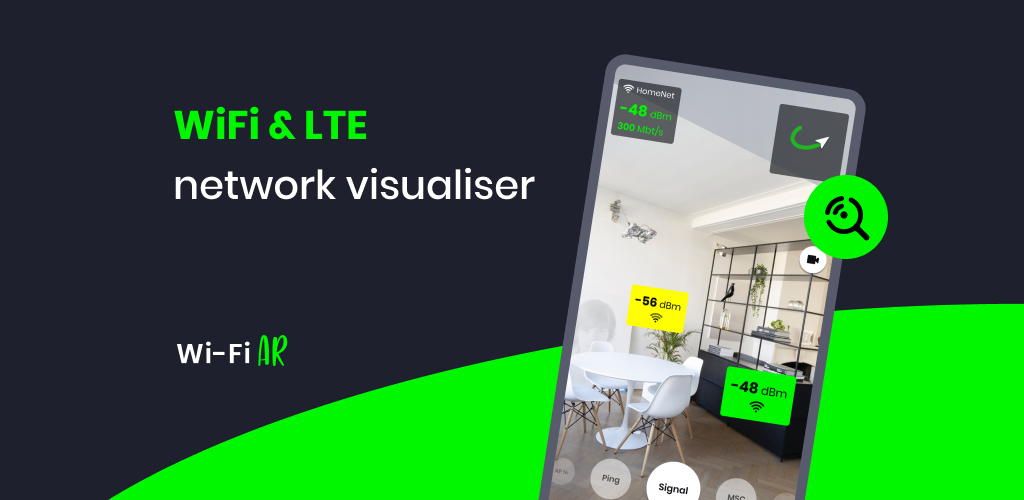
At its core, WiFi AR is a free Android app that turns your smartphone into a portable WiFi detective. Developed by Wi-Fi Solutions out of Ukraine, it’s all about visualizing your network in augmented reality (AR)—think Pokémon GO, but for optimizing your internet instead of catching critters. Instead of staring at boring charts or guessing where to place your router, you point your camera, and boom: colorful overlays show signal hotspots, weak spots, and even pesky interference from neighbors’ networks.
The Purpose: Solving Real-World WiFi Headaches
The whole point of WiFi AR? To make network setup and troubleshooting as intuitive as walking around your house. Whether you’re a homeowner battling thick walls, a gamer chasing lag-free lobbies, or just someone tired of buffering videos, this app cuts through the guesswork. It supports both WiFi and cellular (like 5G/LTE), so it’s versatile for on-the-go checks too. No more relying on gut feelings—WiFi AR gives you data-driven insights to boost your connection quality without calling in a pro.
Standout Features That Set WiFi AR Apart
What really hooks you are the features that blend AR smarts with practical tools. Here’s the lineup:
- Signal Strength Visualization: See dBm levels (that’s signal power) as a heat map overlaid on your room. Green for strong, red for “get that router closer!”
- Speed and Ping Readouts: Real-time download/upload speeds and latency metrics. Perfect for spotting where your ping spikes—crucial if you’re into online gaming or Zoom calls.
- Interference Detector: It flags nearby networks crowding your channel, with tips to switch channels in your router settings for cleaner airwaves.
- Multi-Router Smarts: Got extenders or mesh systems? It checks if your phone’s hopping between access points efficiently.
- ARCore Integration: Powered by Google’s AR tech, it works on compatible devices (check the list in-app). You’ll need to download ARCore if it’s not pre-installed, but it’s a quick one-time thing.
All this in a clean, no-fuss interface that’s easy to pick up, even if you’re not a tech wizard.
Why WiFi AR is a Game-Changer: Benefits That’ll Have You Hooked
Downloading WiFi AR isn’t just about fixing WiFi—it’s about reclaiming your space and sanity. In a world where we’re glued to our devices, a solid connection feels like oxygen. This app delivers big on benefits, especially for busy folks like us.
Everyday Wins for Home Network Heroes
Imagine repositioning your router after a quick scan and suddenly, every corner of your apartment gets full bars. Users rave about how it helped during home office setups or smart home installs—think seamless Alexa control without dropouts. Plus, with over 1 million downloads and a solid 4.4-star rating on Google Play, it’s battle-tested for real homes, not just labs.
Tailored Perks for Gamers, Streamers, and Remote Pros
If latency is your nemesis, WiFi AR’s ping visualization is gold. Walk around while gaming on your phone or tablet, and you’ll pinpoint the sweet spot for buttery-smooth play. Remote workers? Use it to ensure video calls don’t glitch during important pitches. And for cellular users, the 5G/LTE mode means you can scout outdoor coverage before that picnic turns into a data desert.
Bottom line: It’s not hype—it’s efficiency. Save time, cut frustration, and maybe even dodge that expensive mesh system upgrade.
How to Download WiFi AR on Android: Your Step-by-Step Guide
Getting WiFi AR up and running is a breeze, because who has time for complicated installs? Head straight to the Google Play Store and search “WiFi AR” (or tap this link if you’re on mobile). It’s free, with optional in-app purchases to zap ads if they bug you.
Once downloaded (about 50MB, so it won’t hog your storage), grant location permissions—yep, WiFi scanning needs it for accuracy. Fire up the app, let it grab ARCore if needed, and calibrate by pointing your camera at the floor. Pro tip: Start in a familiar room to get the lay of the land. Boom—you’re scanning in seconds. Updates roll out regularly, so keep it fresh for the latest tweaks.
WiFi AR vs. Other WiFi Analyzer Apps: Why AR Wins the Race
The Android app store is flooded with WiFi tools, so how does WiFi AR stack up? Let’s compare it to popular alternatives like WiFi Analyzer by farproc, NetSpot for Android, and Network Analyzer Pro.
Traditional apps like WiFi Analyzer give you channel graphs and signal lists—great for quick scans, but they feel like reading a textbook. NetSpot shines with heatmaps, but it’s more survey-focused and can overwhelm newbies with data dumps. Network Analyzer Pro packs speed tests and device discovery, but lacks that immersive AR layer.
WiFi AR? It leaps ahead with spatial visualization. You see the network in 3D as you move, making it 10x more intuitive for placement tweaks. Sure, it’s ARCore-dependent (so not every old phone plays nice), but for supported devices, it’s unmatched. If you’re on a budget, it’s free-tier friendly, unlike some pro versions that nickel-and-dime you.
In short: Pick WiFi AR if you want fun, visual diagnostics. Go classic for raw data crunching.
Pros and Cons: Keeping It Real with WiFi AR
No app’s perfect, right? Here’s the honest scoop from thousands of reviews.
Pros:
- Intuitive AR Magic: Turns abstract signals into something you can literally walk through—game-changer for setup.
- Comprehensive Metrics: Signal, speed, ping, and interference in one spot. Users love how it reveals hidden weak zones.
- Light on Resources: Runs smooth on mid-range Androids, with infrequent ads that don’t kill the vibe.
- Versatile: WiFi and cellular support means it’s your all-in-one network buddy.
Cons:
- Device Quirks: ARCore limits it to newer phones (like Pixel 3+ or Galaxy S9+). Older models? Stick to basics.
- Ad Nudges: Full-screen pops can interrupt scans—grab the ad-free upgrade for $2.99 if it grates.
- Learning Curve: First-timers might fumble with calibration, but a quick tutorial video sorts it.
Overall, the pros crush the cons for most, earning its “most useful tool ever” badge.
Pro Tips: Maximize WiFi AR Like a Networking Ninja
To squeeze every drop from WiFi AR, here’s my battle-tested advice:
- Scan in Stages: Start floor-by-floor. Note weak spots and test router moves—small shifts can boost signal by 20dB.
- Combine with Router Tweaks: After spotting interference, log into your router (usually 192.168.1.1) and switch to a less crowded channel.
- Battery Saver Mode: AR chews juice, so plug in or dim your screen during long sessions.
- Share Your Maps: Export scans to show your roommate why the couch is now the “lag throne.”
- Update Religiously: The latest patch (August 2025) added band details and fixed video bugs—keeps things snappy.
Follow these, and you’ll wonder how you ever lived without it.
What’s Cooking in the Latest WiFi AR Update?
WiFi AR stays fresh with developer Wi-Fi Solutions dropping updates like clockwork. The August 26, 2025 release? It beefed up WiFi modes with Band/IEEE standards, max Tx/Rx rates, and squashed video capture glitches on picky devices. Earlier drops added cellular deep dives and smoother AR rendering. If you’re on an older version, update now—it’s like giving your app a turbo boost for 2025’s faster networks.
Wrapping Up: Download WiFi AR Today and Wave Goodbye to WiFi Woes
Look, in a nutshell, WiFi AR for Android isn’t just another app—it’s the friendly ghost in your machine that banishes buffering and boosts bliss. With its AR wizardry, spot-on features, and easy download, it’s tailor-made for anyone ready to level up their home network. Grab it from Google Play, scan your space, and thank me later when your streams fly and games don’t stutter.
What’s your biggest WiFi pet peeve? Drop a comment below—I’d love to hear if WiFi AR saves your day too. Happy networking!